



CMS vs. Document Management Systems: Understanding the Difference

Sara Williams
We often get a common, and completely understandable, question:
“So this is more like a document repository to maintain certified content, right?”
At first glance, a Content Management System (CMS) and a Document Management System (DMS) or Enterprise Content Management (ECM) platform can look very similar. Both manage content. Both store files. Both provide workflows and governance.
But underneath the surface, they serve fundamentally different purposes.
And understanding that distinction is critical, especially as enterprises move toward AI-driven digital experiences.
Let’s unpack it.
The Core Misconception
The confusion usually comes from the word “content.”
In a DMS or ECM system, “content” typically means documents:
- PDFs
- Word files
- Contracts
- Policies
- Compliance records
In a CMS, “content” means something broader and more dynamic:
- Web pages
- Structured content (products, articles, metadata)
- Images, videos, and media
- API-delivered content powering apps, sites, and experiences
- But also, document files sometimes including PDFs, contracts, policies and such delivered to website visitors (hence some of the confusion)
A document repository is designed to store and control content. A CMS is designed to create, manage, deliver and experience content.
That’s the fundamental difference.
What a Document Management/Enterprise Content Management System (DMS/ECM) Is Built For
Document Management Systems (like SharePoint, OpenText, Alfresco, Box or Documentum) are optimized for:
1. Governance and Compliance
They ensure documents are:
- Version-controlled
- Auditable
- Secure
- Approved through strict workflows
This is critical for industries like healthcare, finance, and government.
2. Internal Access and Control
DMS platforms are primarily inward-facing:
- Employee portals
- Legal/compliance teams
- Internal knowledge bases
3. File-Centric Management
The document itself is the unit of value:
- Upload a file
- Tag it
- Route it for approval
- Store it securely
Everything revolves around managing that file lifecycle.
What a CMS Is Built For
A modern CMS, especially a headless CMS like CrafterCMS, is optimized for something entirely different:
1. Delivering Digital Experiences
A CMS powers:
- Websites
- Mobile apps
- E-commerce experiences
- Customer portals
- OTT video applications
It’s not just storing content, it’s also delivering content-rich experiences to users in real time.
2. Structured, Reusable Content
Instead of just static files, CMS platforms use:
- Content models
- Structured fields
- Relationships between content
This allows content to be reused across channels and dynamically assembled.
3. Developer + Author Collaboration
CMS platforms are built for:
- Developers (APIs, frameworks, Git workflows)
- Content authors (WYSIWYG editing, previews, workflows)
This is where systems like CrafterCMS differentiate with:
- Git-based content storage
- Visual Experience Builder
- API-first delivery
4. Real-Time Content Delivery
Unlike DMS systems, CMS platforms:
- Serve content via APIs
- Render pages dynamically
- Integrate with front-end frameworks
The goal is not management and/or storage. It’s experience delivery at scale.
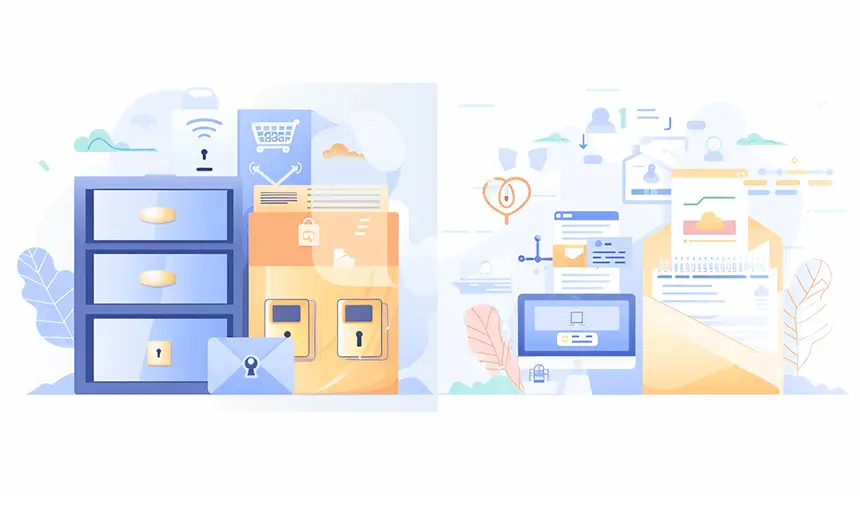
A Simple Analogy
Think of it this way:
- A Document Management System is a vault
- A CMS is a stage
The vault keeps things safe, controlled, and compliant.
The stage presents content to the world: beautifully, dynamically, and at scale.
Both are important. But they solve very different problems.
Where the Lines Blur
Here’s where things get interesting, and where the original question actually has some merit.
A CMS can be used to build:
- Documentation portals
- Knowledge bases
- Policy libraries
- Certified content hubs
In fact, many organizations use CrafterCMS to:
- Publish regulated content externally
- Manage product documentation sites
- Deliver customer-facing knowledge bases
But notice the key difference:
👉 The CMS is not acting as the system of record for compliance
👉 It is acting as the delivery layer for that content
In many enterprise architectures:
- The DMS/ECM remains the source of truth
- The CMS becomes the experience layer
This separation is intentional and powerful.
Why This Distinction Matters More in the AI Era
As AI transforms digital experiences, the gap between CMS and DMS becomes even more important.
AI Needs Structured, Deliverable Content
AI-powered experiences require:
- Structured data
- Clean content models
- API access
- Real-time delivery
A DMS full of PDFs doesn’t fully cut it.
A CMS does.
Conversational Interfaces Depend on CMS Content
When users interact with AI agents:
- They’re not browsing files
- They’re asking questions
- They expect answers, not documents
That means content must be:
- Parsed
- Structured
- Contextualized
- Delivered dynamically
This is exactly what a CMS is designed for.
The Modern Architecture: CMS + DMS Together
The most effective enterprises don’t choose one or the other.
They use both strategically.
A common pattern looks like this:
- DMS/ECM (Box, Documentum, Alfresco, etc.)
- Internal governance
- Compliance workflows
- Document storage
- CMS (CrafterCMS)
- External publishing
- Digital experiences
- API-driven delivery
- AI Layer (CrafterQ)
- Conversational access
- Personalization
- Intelligent recommendations
This layered approach ensures:
- Compliance is maintained
- Experiences are optimized
- AI can operate effectively
Final Takeaway
So, is a CMS like a document repository?
Not quite.
It can manage documents, but that’s not its purpose.
A CMS is built to take content, whether it originates in a DMS or elsewhere, and:
Transform it into dynamic, engaging, AI-ready digital experiences.
And in a world rapidly shifting from browsing… to searching… to conversing…
That distinction isn’t just technical. It’s strategic.
Learn More
Looking to build a document-centric portal or website application? Register for a free CrafterCMS trial today.
Related Tags
Related Posts

Meet the Crafter Studio AI Assistant: AI-Powered Content Authoring

Amanda Jones
MCP and CMS: Connecting AI Agents to Enterprise Content

Amanda Lee

Adobe AEM vs CrafterCMS: Which Enterprise CMS Is Better?
Sara Williams

OpenSearch and CMS: Building Modern Content Search and AI Experiences
Amanda Lee
Related Resources
-
CrafterCMS at eBay: The Universal Content Platform for eBay.com
Webcast
-
Personalized Digital Experiences for a Cruise Liner
Webcast
-
Modernizing Video Delivery and Content Management at CPAC, A Canadian Nationwide Broadcaster
Webcast
-
How to Migrate from Contentful to CrafterCMS
Tutorial
-

Partner Solution: Live Video and Conferencing for Digital Events
Webcast