
Simple Taxonomy Data Source
Data source to select or create content to be used on the form.
Configuration
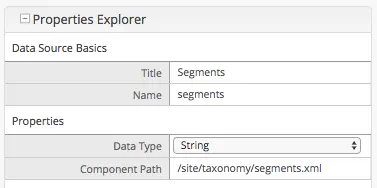
Name |
Description |
|---|---|
Data Source Basics |
|
Title |
Data source title to show on the form |
Name |
Name of variable to store the final result in |
Properties |
|
Data Type |
Key Value pairs type (String, Integer, Float, Date, HTML). |
Component Path |
Path where to browse the datasource items. |
Creating an XML file for the data source
The Simple Taxonomy Data Source uses xml files to get the components that are going to be used. You can create your own component to use as data source by following the instructions on creating a component and just skip creating the view and controller part of the content type if needed.
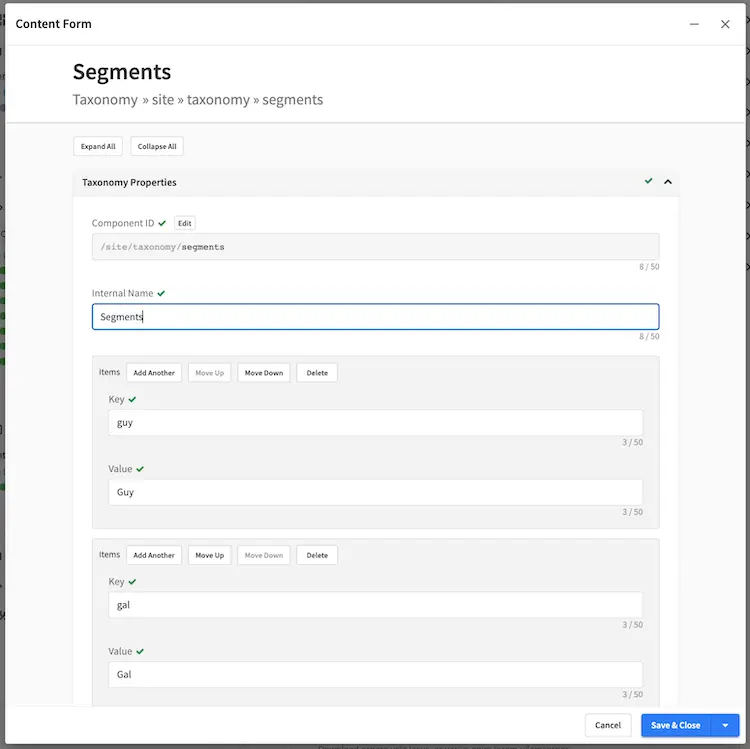
Here’s a sample xml snippet of a simple taxonomy data source file:
<items>
    <item>
        <key>guy</key>
            <value>Guy</value>
        </item>
        <item>
            <key>gal</key>
            <value>Gal</value>
        </item>
</items>
    <file-name>segments.xml</file-name>